Protected Screens
What they saw is
what they signed.
Yuthent draws the approval screen, not the software asking for it. What the screen shows is what the device signs.
The problem
The screen and the request have the same author.
An approval screen drawn by the application requesting the approval is a second object beside the request that leaves it. The person answers the screen. The server records the request. Nothing in between requires the two to say the same thing.
An in-app confirmation screen
The screen and the request are produced by one process, from two separate copies of the same values. That they agree is a convention of the code, not a check anything performs.
A screenshot kept for the record
It is produced by the author of the screen. It records what was drawn. It cannot also be the thing that settles whether what was drawn was right.
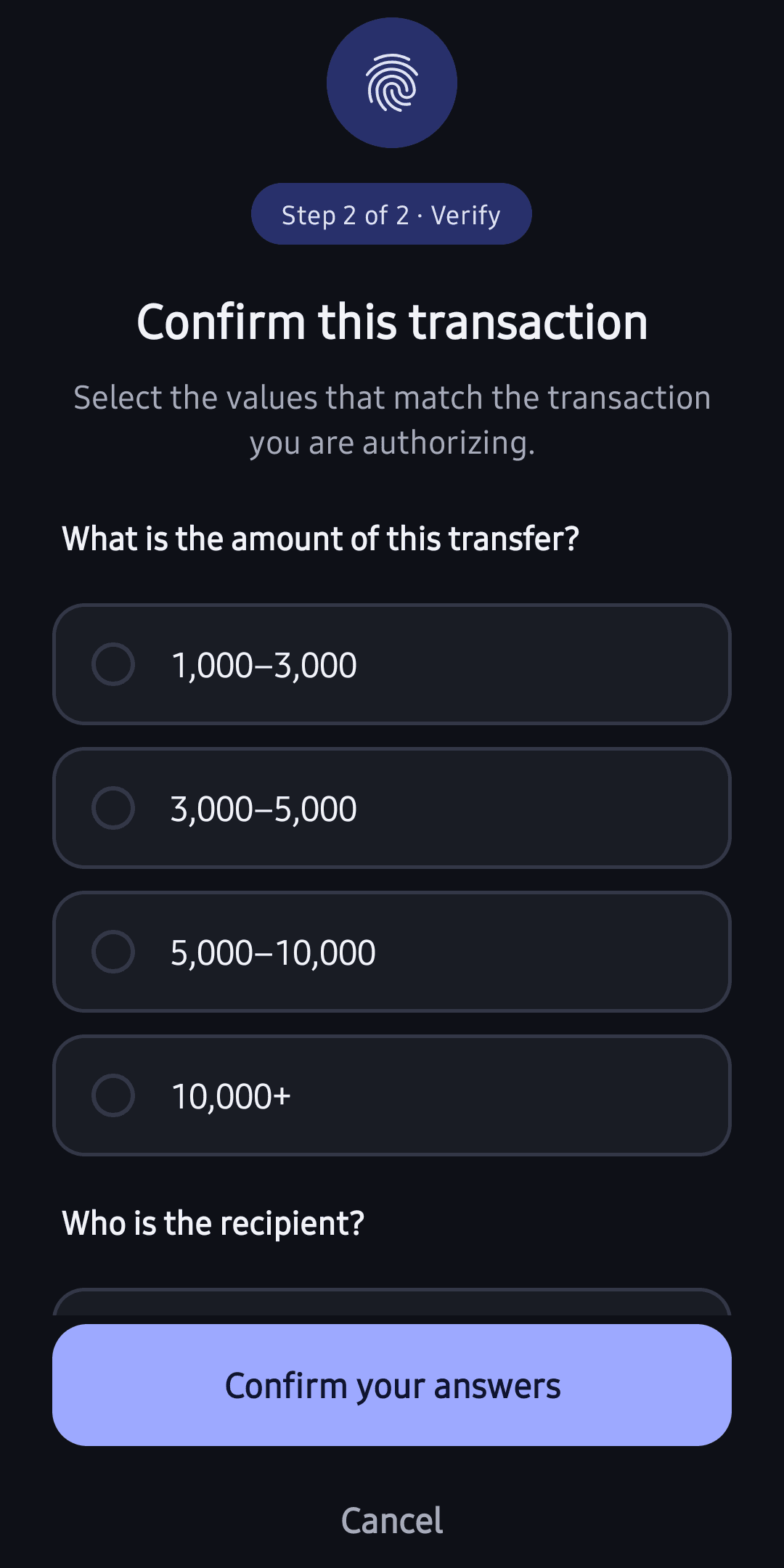
The approval screen
Yuthent draws it. Your application does not.
The surface belongs to the SDK. Your application asks for an approval and is handed the answer; it does not compose the screen the person reads, and it cannot change what that screen says once your backend has sealed it.
The content is yours, and it is sealed
Your own backend writes what the screen says and seals it to the enrolled device before it leaves you. Yuthent carries that sealed content across and does not read it.
The answer on the surface is the person's own
On Android the approval surface accepts a touch only while the system reports nothing drawn on top of it.
At the top level, the terms are withheld
The screen asks what the action is, from options your own system wrote about the real one, and the person picks them out. A wrong answer reveals nothing, and whether the answer matched is settled by Yuthent — a deployment cannot mark its own step-up satisfied.
What the signature carries
The approval carries the content, not a pointer to it.
Where your system discloses the terms, the fields on the screen are the fields inside the signature. Where it keeps them private, the terms never leave the phone and the signature still covers them.
The same object, not two copies
Where your system discloses the terms, the fields drawn on the screen are the fields inside the signature. There is no second copy of the amount and the payee for the two to differ over.
The device will not draw terms it did not sign
Where your backend seals the transaction for display, the device checks it against what it already signed and stops if the two differ. Terms it cannot stand behind are not shown at all.
Released by the person, in hardware
The signing key is held in Android's StrongBox or the TEE, or in the iOS Secure Enclave, and the signature is released by the person's fingerprint or face. It is produced on their phone and nowhere else.
Where it applies
Any approval where the display is the control.
Each is the same claim with different fields on the screen.
A payment confirmation
The payee and the amount the person read are the payee and the amount inside the signature.
A clinical sign-off
The order the clinician approved is the order the signed record carries, not a reference to one held elsewhere.
A privileged change
Which role is being granted, and to whom, is on the screen the approver signed.
A sensitive export
What is leaving, and how much of it, is what the approval covers.
A hand-back from an agent
When an agent's work reaches something that needs a person, what the person is shown is what their approval will carry.
The boundary of the guarantee
Where this stops.
What the screen settles, what the two platforms each give, and what nothing gives. Stated here, not hidden.
The check runs on the phone
The comparison between what is drawn and what was signed happens in the SDK's own process, on the device. Nothing on our servers inspects what your screen displayed, and this page does not claim otherwise.
Android and iOS are not at parity
Android keeps the approval window out of screenshots, recordings and the recents preview. iOS has no equivalent: it covers the terms while the screen is being recorded, mirrored or shared, and it cannot stop a still screenshot. There is no supported way to.
There is no trusted display underneath this
Neither mobile platform gives an application a display path driven by the secure hardware, and the SDK does not use one. What it has is an ordinary application window with the platform's window protections on it, and the cryptographic part above.
A camera, and a rooted or jailbroken phone
Neither is something a screen can answer. Neither is a way to authorize an action either: the signature still needs the key in the phone's secure hardware and a live fingerprint or face.
What a signature settles
It settles that this device's key signed exactly this content, released by a fingerprint or face the device accepted. It does not say who that person is in the world, and it does not make a decision a good one.
First-call questions
Answered plainly.
Does this mean we cannot brand the approval screen?
You supply the content and the presentation inside the protected surface, your own wording included. What your application does not do is draw over that surface, or change what it says after your backend has sealed it.
Is this a trusted display driven by the secure element?
No, and the page does not claim it. Neither mobile platform exposes a display path like that to an application. What is here is an ordinary application window with the platform's window protections applied, and above that the part that is cryptographic: the device will not draw terms that differ from the ones it signed.
Can Yuthent see what our approval screens say?
No. Your backend seals the content to the enrolled device before it leaves you, and we carry it without reading it. On the path where your system keeps the terms private, they never leave the phone at all.

See it on your own flow.
Your app, your call, our SDK.